Exploiting And Patching Hidden Path Traversal Issue
I was contributing to a project called Letta Code. Previously, I nudged
the team to merge a pending security patch after making a POC
for it. Once the patch was merged, I pulled the latest source to be reviewed by AI to verify if there is no more
issue related to letta --import.
There is one more, it says.
Before discussing the issue, let’s understand what letta --import is. I’ve briefly explained how Letta
import works on previous post. I’ll copy paste here for convenient and
we can focus on what is the issue.
Letta ‘Import’ Feature
Letta Code has a feature to import an agent. It is by importing .af file or so called Agent File. “It provides a portable way to share agents with persistent memory and behavior across different environments.” according to their docs. There are two ways to import an agent, from a file or Letta registry. User only need to run
# import from local file
letta --import <filepath>

# import from Letta registry
letta --import <@author/name>
then it will import the agent memory, skills, and personality to be available in the user machine. Let’s
focus on the skills part. The agent file include skills section to tell what skills the agent have.
There are 2 ways to import skill, from filepath and from GitHub repository. I’m focusing the example for
importing skill from filepath. It looks like this
{
  "name": "my-skill",
  "files": {
      "SKILL.md": "My skill is creating a new skill",
      "references/principle.md": "This is my principle to learn a new skill"
  }
}
When Letta saw this section, it will create a folder inside ~/.letta/agents/<agent-id>/memory/skills which
follows the configuration above, in this case my-skill. Inside that folder would be anything that is
stated on files like SKILL.md and a folder references which contain principle.md file. So in the
end it looks like this
.letta/
├── agents
│   ├── agent-379b197a-aa47-4967-8cec-dc1fe609a40b
│       └── memory
│           └── skills
│               └── my-skill
│                   ├── SKILL.md
│                   └── references
│                       └── principle.md
False Assumptions
Let’s peek at the source code of how it loads skills from files,
// NOTE: trimmed version for brevity
export async function extractSkillsFromAf(
  afPath: string,
  destDir: string,
): Promise<string[]> {
  const extracted: string[] = [];

  // Read and parse .af file
  const content = await readFile(afPath, "utf-8");
  const afData = JSON.parse(content);

  if (!afData.skills || !Array.isArray(afData.skills)) {
    return [];
  }

  for (const skill of afData.skills) {
    const skillDir = resolve(destDir, skill.name);
    await mkdir(skillDir, { recursive: true });

    if (skill.files) {
      await writeSkillFiles(skillDir, skill.files);
      extracted.push(skill.name);
    }
    // ...
  }
  // ...
}
The afPath is the filepath of the Agent File which is passed when we run letta --import <filepath> while
the destDir is the directory which I mentioned before to store skills for respective agent. So far it looks
good, but there is another function that is interesting, writeSkillsFiles receives skill.files[] which
is a list of skill files that I showed earlier in the sample of agent file. Let’s have a closer look
async function writeSkillFiles(
  skillDir: string,
  files: Record<string, string>,
): Promise<void> {
  for (const [filePath, fileContent] of Object.entries(files)) {
    await writeSkillFile(skillDir, filePath, fileContent);
  }
}

async function writeSkillFile(
  skillDir: string,
  filePath: string,
  content: string,
): Promise<void> {
  const fullPath = resolve(skillDir, filePath);
  await mkdir(dirname(fullPath), { recursive: true });
  await writeFile(fullPath, content, "utf-8");
  //...
}
So what happen there, from skill.files it takes the key of the object inside files as
the filepath while the value of the object as the content of the file. So if the value is like
this
{
  "name": "my-skill",
  "files": {
      "SKILL.md": "My skill is creating a new skill",
      "references/principle.md": "This is my principle to learn a new skill"
  }
}
It means the code will write every filepath in files to a directory named my-skill so we’ll have:
- ~/.letta/agents/<agent-id>/memory/skills/SKILL.md
- ~/.letta/agents/<agent-id>/memory/skills/references/principle.md
At a glance, everything looks normal, we can make two assumptions:
- Skill name is a directory name that will be placed inside skills directory
- Skill files are files/directories that will be placed inside the respective skill name directory
Let’s take a look at this line:
const fullPath = resolve(skillDir, filePath);
Based on Node.JS docs, resolve method “resolves a
sequence of paths or path segments into an absolute path.”. Which means if we put any relative path it will
be resolved into an absolute path. Since I’m testing on Linux, it means if I put something like
resolve("/home/user/.letta/agents", "../../")
It should resolve to /home/user since ../ means go one level up from current directory.
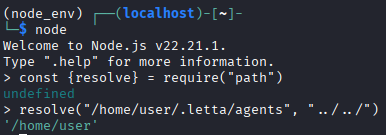
Well, it does. Let’s confirm whether this is handled by Letta Code. We need to alter the skills in the Agent File into like this
{
    "name": "safe-skill",
    "files": {
        "SKILL.md": "My skill",
        "../../../../../../OH_MY_FILE.md": "This file was written outside the imported skill directory."
    }
}
The valid path there means it will write a file called OH_MY_FILE.md to the Linux $HOME directory. Which
means outside the respective skill directory. Here is the screenshot of the import:
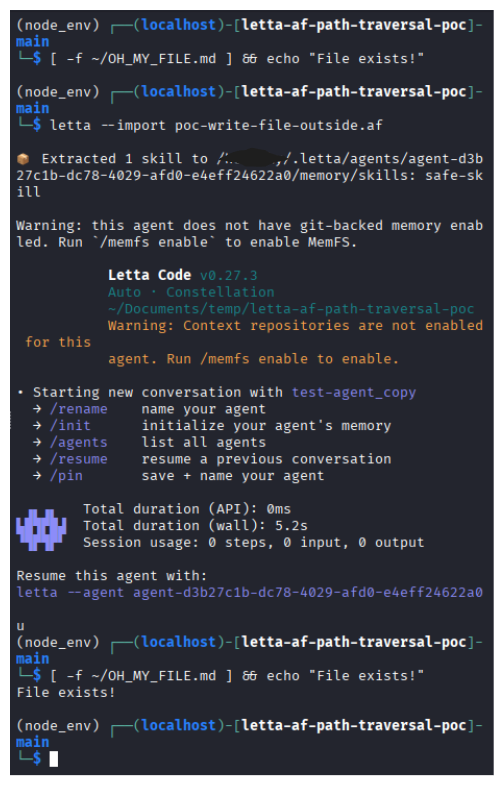
Uh-oh. It works. The file is written outside the respective skill directory. The command
[ -f ~/OH_MY_FILE.md ] && echo "File exists!"
shows that if the file exists, it will print “File exists!” otherwise it prints nothing. However, apparently my second assumption was wrong. The skill files can be written outside the respective skill directory. We found an issue.
Yet at what costs? Remember that in the source code we looked before, it creates a file by calling writeFile
from Node.JS fs library. It doesn’t just
create a file, but it also overwrites it. This could be serious if the file is used to overwrite, say, .bashrc file
so it will run malicious command everytime. This could be a vulnerability.
There’s one more
We need to test the first assumption, does this issue also apply on skill name? Let’s recall the code
  for (const skill of afData.skills) {
    const skillDir = resolve(destDir, skill.name);
    await mkdir(skillDir, { recursive: true });
    //...
  }
Learning from the previous issue with skill files, this should behave the same way, let’s prove it!
{
    "name": "../../../../../LETTA_AF_IMPORT_SKILL_NAME_ESCAPE",
    "files": {
        "SKILL.md": "# Skill name traversal PoC\n\nThis file was written outside the intended skills directory because skill.name was used as a path segment without validation.\n"
    }
}
Looks weird yet let’s see if there is a directory named LETTA_AF_IMPORT_SKILL_NAME_ESCAPE in $HOME.
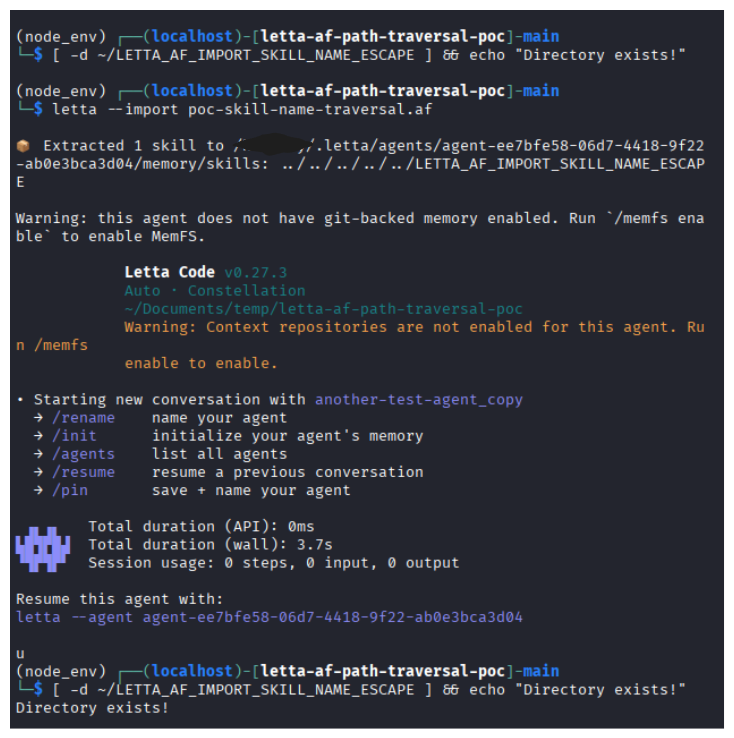
Eh? It works. Seems first assumption is also wrong. The skill name is a directory name that can be placed outside skills directory.
We have tested the assumptions and seems the path traversal issues happen on both skill name and also the skill files.
Patching Path Traversal Issue
This issue occurs because the code treats the Agent File as trusted input. We need to lower our trust threshold and handle this data more carefully. It means, the input needs to be validated first, if there is part that doesn’t meet its requirements, then we reject the input.
So we create rules for 2 categories: skill name and skill filepath.
Skill Name Rules
The skill name is the most straightforward. We just follow our initial assumption. It should be just a normal character like alphabet. Yet each developer has their own style to name it so we can add more allowed characters. So skill name must contain no other than:
- maximum 64 characters
- alphabet
- number
- dash (-)
- underscore (_)
- dot (.)
The regex looks like this
const IMPORTED_SKILL_NAME_PATTERN = /^[A-Za-z0-9._-]+$/;
So here is how the function looks like
const MAX_SKILL_NAME_LENGTH = 64;
const IMPORTED_SKILL_NAME_PATTERN = /^[A-Za-z0-9._-]+$/;
function validateImportedSkillName(name: string): string {
  const trimmedName = name.trim();
  if (
    trimmedName !== name ||
    trimmedName.length === 0 ||
    trimmedName.length > MAX_SKILL_NAME_LENGTH ||
    trimmedName === "." ||
    trimmedName === ".." ||
    !IMPORTED_SKILL_NAME_PATTERN.test(trimmedName)
  ) {
    throw new Error(
      `Invalid imported skill name "${String(name)}". Skill names may only contain letters, numbers, dots, underscores, and hyphens.`,
    );
  }

  return trimmedName;
}
Skill Filepath Rules
The skill filepath is a bit complex since we need to prevent the path to be resolved outside the respective skills directory. We need to enforce the skill filepath to be inside the respective skill directory. Which means the value must reject:
- dot (.)
- backslash (\)
- absolute path
- null byte termination (\0)
- any “…”
The function looks like this,
function validateImportedSkillFilePath(filePath: string): string {
  if (
    filePath.length === 0 ||
    filePath === "." ||
    filePath.includes("\0") ||
    filePath.includes("\\") ||
    isAbsolute(filePath) ||
    win32.isAbsolute(filePath)
  ) {
    throw new Error(`Invalid imported skill file path "${filePath}".`);
  }

  const segments = filePath.split("/");
  if (
    segments.some((segment) => !segment || segment === "." || segment === "..")
  ) {
    throw new Error(`Invalid imported skill file path "${filePath}".`);
  }

  return filePath;
}
The function rejects any input like ../../../file or even skill/../../../../file, and so on.
Although this require a lot of check, it ensures that the Agent File has a valid skill filepath since
during writing a skill file, the function potentially overwrite existing file. Hence we must be very careful
treating the skill filepath as input.
Testing
Let’s test the result, using the same agent file, starting from invalid skill filepath
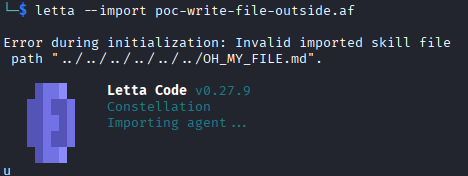
Awesome, it fails. Now let’s test another one, invalid skill name.
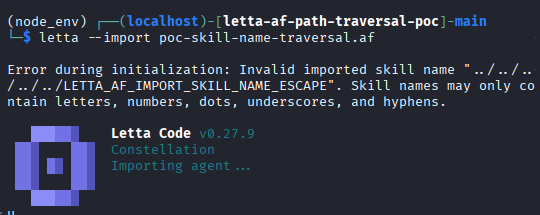
Yes, so those input are now invalid. It means we just fixed the path traversal issues!
I’ve created a PR for this and reached out to Letta team to review it. They’re quite responsive and I’m happy to be able to contribute to their project. I’ve been using AI and Letta Code to explore the issue. It really helps me to learn what kind of security issue that needs to be watchout when creating an AI agent tools like Letta Code.